1 photo. One AI Crying video.
MonthlyWatermark-free MP4 · Ready for TikTok/Reels · from $4.99 first week
1 photo. One AI Crying video.
Input: 1 photo (JPG / PNG / WEBP, ≤10 MB, clear adult face). Output: ~15s 9:16 MP4 for TikTok/Reels (watermark-free MP4 · Ready for TikTok/Reels · 500 credits). Pricing: monthly from $4.99 first week — not free unlimited; new accounts get 20 welcome credits ≈ 2 images (video still needs a plan); cancel anytime. Barriers: 18+, photo rights, consent checkbox, Stripe. No app download.
- 1 photo
- ~15s
- 9:16
- Ready for TikTok/Reels
- From $4.99 first week
Input: 1 photo (JPG / PNG / WEBP, ≤10 MB, clear adult face). Output: ~15s 9:16 MP4 for TikTok/Reels (watermark-free MP4 · Ready for TikTok/Reels · 500 credits). Pricing: monthly from $4.99 first week — not free unlimited; new accounts get 20 welcome credits ≈ 2 images (video still needs a plan); cancel anytime. Barriers: 18+, photo rights, consent checkbox, Stripe. No app download.
- 1 photo
- ~15s
- 9:16
- Ready for TikTok/Reels
- From $4.99 first week
Sample from this template
Sample from this template
 Sample input
Before
 After
AfterAfter · sample
Comparison: left = upload slot; right = catalog demo poster/result (no fake screenshots). Paid jobs use your uploaded photo(s). Adults 18+ · photo rights · independent fan tool, non-official.
- 011
- 022
- 033
More examples of this template · 2
Curated examples of this look. Tap “Make this look” to create with this template.
- After · sample
AI Crying Video: Make the Tears Effect From One Photo · 1
Example 1 · same template
- After · sample
AI Crying Video: Make the Tears Effect From One Photo · 2
Example 2 · same template

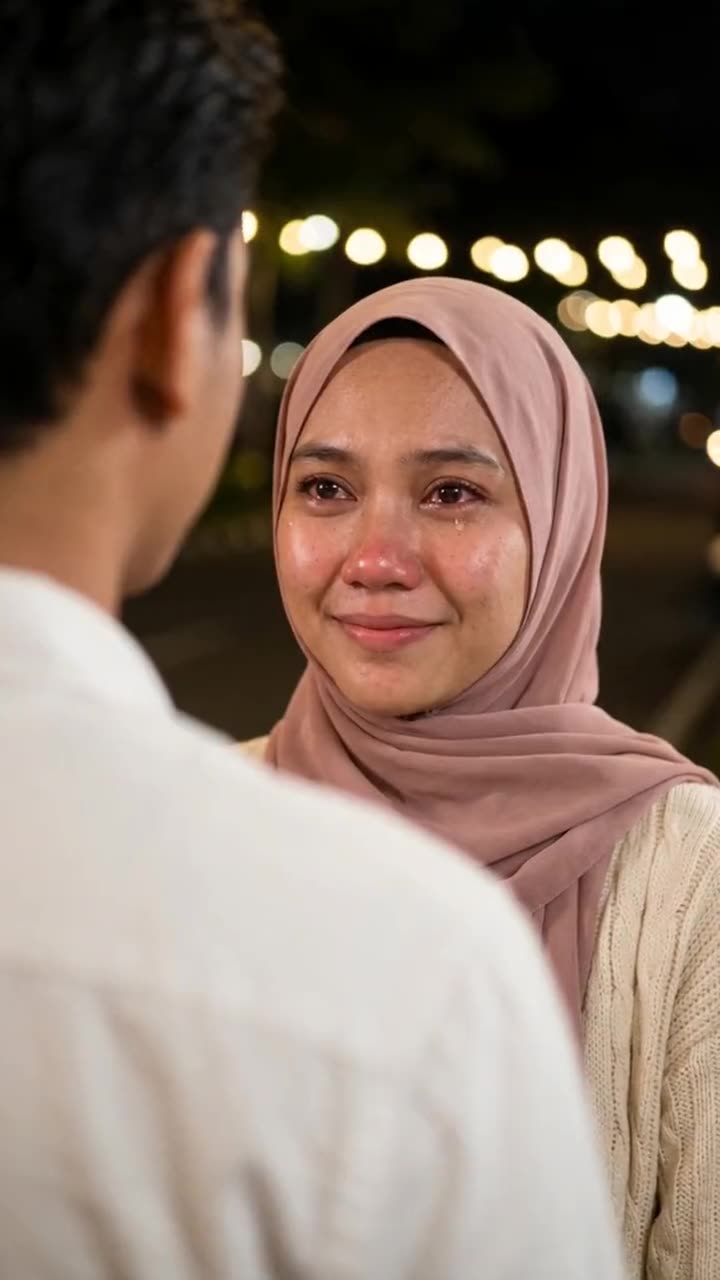
What this template does
The AI crying trend turns one photo into a 10-second drama scene.
What is the AI Crying Video trend, and where did it start?
The trend runs on one common edit apps template, **Cinematic Emotional Farewell**. A tutorial posted on 25 September already showed it at 17.6 million uses. Every popular clip has the same shot: an over-the-shoulder close-up at night, the back of a person in a white shirt blurred in front, warm bokeh lights behind, and a face that goes from a fragile smile to quiet tears.
AI Crying Video trend timeline
- 2026-09-21A "cry face" AI video goes up on TikTok and reaches about 960,000 views; crying-effect clips climb from this day.
- 2026-09-24The first common edit apps farewell clips with the over-the-shoulder night shot appear; one in a hijab reaches 295,000 views.
- 2026-09-25An Indonesian tutorial for the template goes up and passes 6.8 million views; the template shows 17.6 million uses in it.
- 2026-10-01Tagalog tutorials show the same effect in Dreamina AI and reach 688,000 views.
- 2026-10-04All 10 top "AI crying" clips on TikTok show the same over-the-shoulder night shot in our frame-by-frame read.
Photo requirements for AI Crying Video
- A head-and-shoulders selfie works best. The photo step rebuilds the night scene, the light and the person in front of you.
- Start from a soft smile or a neutral look. The clip opens on a fragile smile.
- Even light on the face. Heavy shadows or sunglasses hide the eyes and the tears.
- Any background is fine: the photo step replaces it with the night park.
- Use a photo of yourself or of an adult who agreed to it. Never a stranger, a celebrity or a child.
Troubleshooting AI Crying Video
- --- — ---
- The face changes into someone else — Use a sharper, larger photo of the face. Keep "exactly the same" in the prompt.
- The crying looks cartoonish or loud — Keep "real, subtle acting, never exaggerated" in the prompt. A second run often comes back calmer.
- The person in front is too sharp — Keep "heavily blurred into a soft shape" in the photo prompt, or run the photo step again.
How AI Crying Video differs from common face-swap templates
RemixMeme uses a site-locked catalog prompt for AI Crying Video — upload and generate; you do not paste a third-party prompt.
Scene and motion follow this page’s samples; identity stays as close as possible to your photo.
Babies and unauthorized celebrity likenesses are out of scope — adults 18+ with photo rights only.
Caption & hashtag ideas for AI Crying Video
- Trying AI Crying Video
- Keep the AI label on
- Tag who has to go next
- Match a trending sound when you post
Hashtags that fit: #aicryingvideo · #aivideo · #remixmeme
Keep the platform AI label on. RemixMeme does not license commercial tracks — add the trending sound yourself. Monthly from $9.99 · 720p=500 credits.
Step-by-step guide: Read the how-to tutorial
What happens beat by beat — AI Crying Video
RemixMeme locks a public catalog prompt for AI Crying Video. Default ~15s 9:16. Signature moves land roughly like this:
- 0–3s01
Open
Establish the AI Crying Video frame from your photo(s).
- 3–11s02
Signature
roll down both cheeks, the lips and chin quiver, and they look down, crying quietly
- 11–15s03
Close
Keep face and outfit consistent; hold or cut out.
What is AI Crying?
The AI crying trend turns one photo into a 10-second drama scene.
On this site, AI Crying turns 1 photo into a ~15s 9:16 meme / viral MP4. Input: JPG / PNG / WEBP, ≤10 MB. Output: watermark-free MP4 Ready for TikTok/Reels (500 credits; draft 375). Plans Weekly $12.99/wk · Monthly Starter $24.90/mo · Monthly Pro $59.90/mo · Yearly Starter $199/yr · 1× Pack $11.99 · 3× Pack $29.90 · 10× Pack $69.90; cancel anytime. Failed generations return credits. New accounts get 20 welcome credits ≈ 2 images; video renders still need a plan.
Compared with timeline editors and CapCut-style mobile templates, this page is a locked one-click CapCut template alternative — no prompt to write, no multi-track edit, no app download. See /vs-capcut and /alternatives.
Independent fan tool: not affiliated with meme originators, platforms, or brand owners. We do not host originals as “official.” Do not use official logos. Adults 18+ with mutual consent / photo rights only.
Light compare vs timeline editors / CapCut-style tools · CapCut / AI meme app alternative
Why this template
Locked prompt
Public template prompt wired in — 1 photo in, ~15s out.
Numbered pricing
Weekly $4.99 first week then $12.99/wk · Monthly Starter $14.99→$24.90/mo · Pro $34.99→$59.90/mo.
Export credits
Ready for TikTok/Reels = 500 credits · draft = 375 · 9:16 default.
Consent first
18+ faces you have rights to. Label AI when you post. No official logos.
Steps
- 01
1. Upload 1 photo
JPG / PNG / WEBP, ≤10 MB each. Clear adult face(s). One person is enough.
- 02
2. Subscribe for credits
Weekly first week $4.99 (500 credits ≈1 video · Ready for TikTok/Reels) then $12.99/wk. Monthly Starter $14.99→$24.90/mo (1500). Pro $34.99→$59.90/mo (5000). Cancel anytime.
- 03
3. Generate & download
~15s 9:16 MP4. Draft costs 375 credits; Ready for TikTok/Reels export costs 500. Failed jobs refund credits.
AI Meme Video Templates for Viral Trends
222 generate-ready templates. Add your photo(s) and make yours. Plans from $4.99 first week.




Add 1 photo and unlock Create
Plans from $4.99 first week. ~15s MP4. Failed renders return credits.
CreatePhotos are personal. We keep them briefly.
- 01
Upload
Stay local until you subscribe and create — JPG / PNG / WEBP, ≤10 MB.
- 02
Generate
Render uses a short-lived private link when you create.
- 03
Cleanup
Source photos are not kept as a long-term gallery — see Privacy Policy.
- 04
Download
Save your MP4 promptly; render links expire.
Risk & legal boundaries
Independent fan tool. We do not host originals as official. AI-generated entertainment only — label AI when you post. Adults 18+ who agreed. No official logos as identity sources.
- Not affiliated with meme originators, platforms, CapCut, or any brand owner. No official logos. Not an official CapCut template pack.
- Adults (18+) with photo rights / mutual consent only. User confirms rights to every face. No children, celebrities as identity sources, or non-consensual deepfakes.
- Audio is AI ambient / original — we do not sell commercial track licenses. Add trending sounds yourself on TikTok/Reels.
- Subscription from $4.99 first week — not free unlimited. New accounts get 20 welcome credits ≈ 2 images; video still needs a plan. Failed jobs refund credits.
Fan tool on this site · 2026. Photo rights + adult consent required. CapCut / AI meme app alternative: /vs-capcut · /alternatives.
Pricing
Choose Weekly, Monthly, Yearly, or a one-time pack. Cancel anytime.
Failed generations automatically return your credit. Renders usually take a few minutes.
한정 혜택
첫 주 $4.99 — 이후 정상가
12:00:00 후 종료
Weekly
first week $4.99 then $12.99/wk · ≈1 video · Ready for TikTok/Reels
$4.99/wk
≈1 videos/week · Ready for TikTok/Reels
cancel anytime · Ready for TikTok/Reels
Monthly Starter
first month $14.99 then $24.90/mo · ≈3 videos · Ready for TikTok/Reels
$14.99/mo
≈3 videos/month · Ready for TikTok/Reels
cancel anytime · Ready for TikTok/Reels
Monthly Pro
first month $34.99 then $59.90/mo · ≈10 videos · Ready for TikTok/Reels
$34.99/mo
≈10 videos/month · Ready for TikTok/Reels
cancel anytime · Ready for TikTok/Reels
Yearly Starter
first year $159 then $199/yr · ≈36 videos · Ready for TikTok/Reels
$159/yr
≈36 videos/year · Ready for TikTok/Reels
cancel anytime · Ready for TikTok/Reels
1× Pack
500 credits · never expire
$11.99
≈1 videos · Ready for TikTok/Reels
never expire · Ready for TikTok/Reels
3× Pack
1500 credits · never expire
$29.90
≈3 videos · Ready for TikTok/Reels
never expire · Ready for TikTok/Reels
10× Pack
5000 credits · never expire
$69.90
≈10 videos · Ready for TikTok/Reels
never expire · Ready for TikTok/Reels
Not free unlimited. Failed jobs refund credits. Cancel anytime on subscriptions. One-time pack credits never expire.
FAQ
1 photo in → one ~15s 9:16 AI Crying MP4. The AI crying trend turns one photo into a 10-second drama scene.
Same studio
Related tools/ 相关工具
More AI short-video trends — create on this site with one shared credit balance
- 1–2 photos → Burning Bridges crystal-chandelier party template (MP4 with sound)
 Burning Bridges AI
 - Two photos → ~10–15s white-studio keys + hype short
 Alors on Danse AIMini-keyboard meme
 - 1–2 photos → barn tip-toe / Wing In My Jawwdinz dance short
 Rumpelstiltskin Dance AIBarn tip-toe meme
 - 1 photo → quarrel / lip-sync dance deadpan short
 Bad Times AIQuarrel dance short
 - Selfie + optional car → 24 card car reveal video
 Unforgettable Car AI24 card car reveal
 - 1 selfie → ChatGPT Millionaire “Get a job.” meme short
 ChatGPT Millionaire AIGet a job. meme
 - 2 photos → Hug in Heaven stairway reunion memorial short
 Hug In Heaven AIStairway reunion memorial
 - 1 selfie → Chat GTT Lookin’ Ahh “card declined” meme short
 Chat GTT Lookin’ Ahh AIcard declined meme
 - 1 photo → ~13–15s Shan Shen Bu / flash-step AI dance
 Shan Shen Bu AI DanceFlash Step AI
 - 1 selfie → ~10s rocket-over-traffic Flying Roadster short
 Flying Roadster AIFlying Car AI
 - 1 face photo → ~10s quince concha / Bby Wow Guy meme short
 Bby Wow Guy AIquince concha meme
 - 1 photo (+ optional outfit) → ~15s doorway-to-leather night glow-up
 Devil Wears Prada AIleather street glow-up
 - 1–2 photos → ~10s stadium kiss-cam (hug → shock → hide)
 Kiss Cam AIstadium kiss-cam joke